Custom Toolbar是一款很实用的Unity编辑器插件,有很多方便Unity开发者使用的小工具。
1.下载途径:GitHub – smkplus/CustomToolbar: CustomToolbar 这里感谢smkplus (Seyed Morteza Kamali) · GitHub 的开源和分享。
2.操作界面和Setting界面介绍
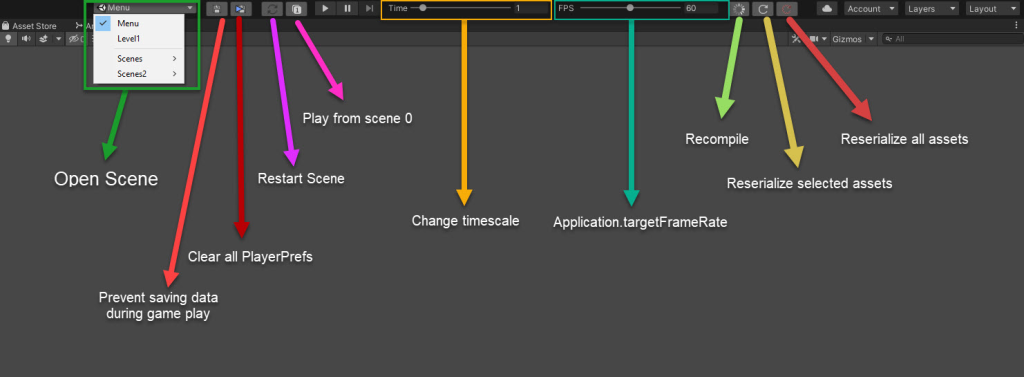
导入插件到Unity,很容易看到
操作界面在最上层菜单栏下方,各个功能分别和Setting界面对应
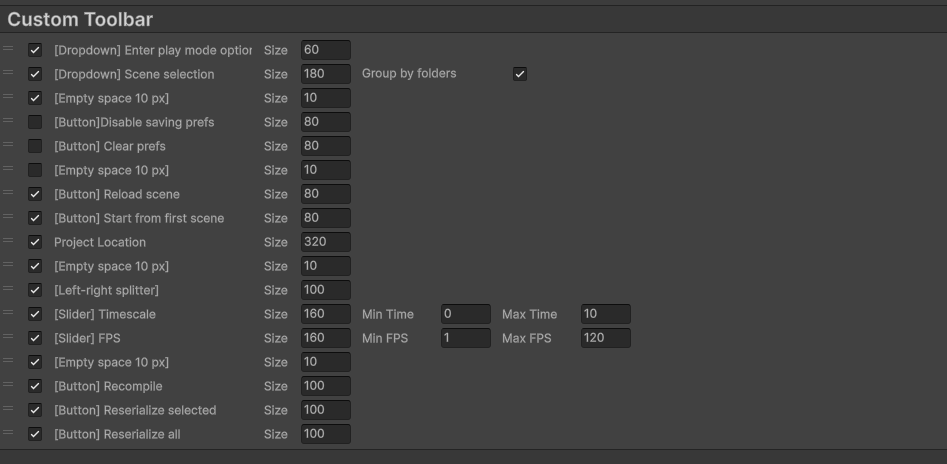
Setting从Edit-ProjectSettings-Custom Toolbar 打开
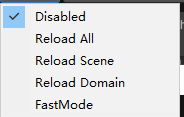
- 1.进入Play模式的设置选择,包括以下四个选项:
- 2.选择场景,很方便的功能,能快速切换当前场景。
- 3.Prefs相关,这里我用的比较少,所以取消勾选了。
- 4.重新加载场景。
- 5.从第一个场景打开,这里的第一个场景是BuildSetting的SceneList的第一个场景。
- 6.改变TimeScale和FPS
- 7.重新编译,重新序列化选中资源和重新序列化所有资源
3.这里我新增了一个功能,显示当前项目路径

因为我有很多项目,所以加了这个项目路径的显示。
代码也比较简单:
using System;
using System.Collections;
using System.Collections.Generic;
using UnityEngine;
using UnityEngine.SceneManagement;
using UnityEditor;
using UnityEditor.SceneManagement;
using UnityToolbarExtender;


[Serializable]
internal class ToolbarLocation : BaseToolbarElement
{
    private static GUIContent Content;

    public override string NameInList => "Project Location";

    public override void Init()
    {
        string projectPath = Application.dataPath;
        projectPath = projectPath.Replace("/Assets", "");
        Content = new GUIContent($"{projectPath}");
    }

    protected override void OnDrawInList(Rect position)
    {

    }

    protected override void OnDrawInToolbar()
    {
        GUILayout.Label(Content, GUILayout.Width(WidthInToolbar));
    }


}
还需要再CustomToolbarReordableList和CustomToolbarSetting 列表里面新增new ToolbarLocation()