最近在发布GooglyPlay海外的休闲游戏,发现之前使用的分析崩溃、错误插件-Bugly 不能用了,因为Bugly的数据是保存在国内的,不符合数据隐私和合规性的要求;后续发现海外版本Bugly叫CrashSight,但是是要收费的,所以就找到了这个微软的AppCenter https://learn.microsoft.com/zh-cn/appcenter/quickstarts/
AppCenter
全称是Visual Studio App Center,功能也挺多的,这里我主要是使用它的分析Analytics和崩溃Crashes 这两个部分。
Unity入门
1.先去https://appcenter.ms/ 注册账号
注册之后添加新应用,输入名称和备注,选择平台,点击添加按钮创建;创建后在 “设置” 页面的右上角,单击 三个垂直点 获取秘钥App Secret,后续有用到。
2.下载UnityPackage
- 2.1 可以选择在Releases · microsoft/appcenter-sdk-unity下载单个包
- 2.2 也可以先下载https://github.com/Microsoft/AppCenter-SDK-Unity-Extension 编辑器扩展 插件,然后在编辑器安装。
这里由于国内网不好,我选择安装单个包AppCenterAnalytics-vX.X.X.unitypackage和AppCenterCrashes-vX.X.X.unitypackage。
3.导入Unity及启用
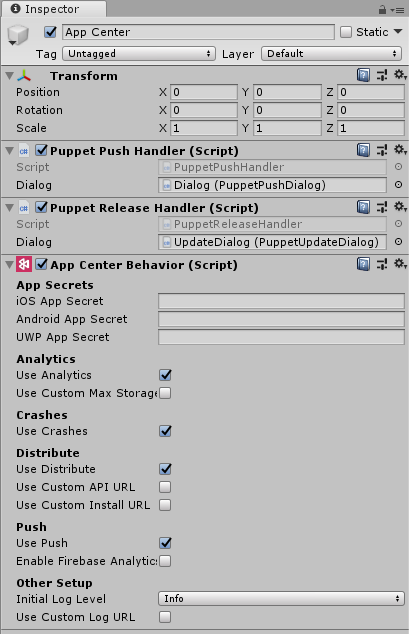
导入Unity后,在启动场景的空物体上添加脚本AppCenterBehavior,然后输入对应平台的第一步得到的秘钥App Secret。
4.使用分析App Center Analytics
在代码中
using Microsoft.AppCenter.Unity.Analytics;
await Analytics.SetEnabledAsync(true);//启用
然后调用 TrackEvent()方法
Analytics.TrackEvent("Video clicked", new Dictionary<string, string> {
	{ "Category", "Music" },
	{ "FileName", "favorite.avi" }
});
即可发送事件。
5.使用诊断App Center Crashes
5.1 在代码中
using Microsoft.AppCenter.Unity.Crashes;
await Crashes.SetEnabledAsync(true);//启用
5.2 是否应处理故障:
如果要确定是否需要处理特定的崩溃,请设置以下回调。
Crashes.ShouldProcessErrorReport = (ErrorReport report) =>
{
    return true;
};
5.3 报告未经处理的异常:
默认情况下,App Center SDK 不会报告应用中引发的未处理的异常,这些异常不会导致严重崩溃。 若要启用此功能,请调用以下方法:
Crashes.ReportUnhandledExceptions(true, true);5.4 新增方法上报异常:
        public static void Track(string logString, string stackTrace, LogType type, IDictionary<string, string> properties = null, params ErrorAttachmentLog[] attachments)
        {
            if (LogType.Assert == type || LogType.Exception == type || LogType.Error == type)
            {
                var exception = CreateWrapperException(logString, stackTrace, type);
                CrashesInternal.TrackException(exception.GetRawObject(), properties, attachments);
            }
        }
这个方法就统一处理了所有的日志,以及根据具体场景决定是否上报,其中比较重要的是参数properties
可以传递一些这个玩家的设备的一些信息。例如我是传递固定信息:
    private static Dictionary<string, string> HardwareInfoDic;
    private static Dictionary<string, string> GetHardwareInfo()
    {
        if (HardwareInfoDic == null)
            HardwareInfoDic = new Dictionary<string, string>
            {
                { "处理器 类型/数量/频率:", SystemInfo.processorType+"/"+SystemInfo.processorCount+"/"+SystemInfo.processorFrequency },
                { "系统 内存/显存:", SystemInfo.systemMemorySize + "MB"+"/"+ SystemInfo.graphicsMemorySize + "MB"},
                { "图形设备 名称/ID:", SystemInfo.graphicsDeviceName +"/"+SystemInfo.graphicsDeviceID.ToString()},
                { "图形设备 供应商/供应商ID:", SystemInfo.graphicsDeviceVendor+"/"+SystemInfo.graphicsDeviceVendorID },
                { "图形设备 API类型/着色器级别:", SystemInfo.graphicsDeviceType.ToString() +"/"+SystemInfo.graphicsShaderLevel.ToString()},
                { "多线程渲染/渲染线程模式:", SystemInfo.graphicsMultiThreaded.ToString()+"/"+ SystemInfo.renderingThreadingMode.ToString()},
                { "最大纹理尺寸/支持多采样纹理:", SystemInfo.maxTextureSize.ToString()+"/"+SystemInfo.supportsMultisampledTextures.ToString() },
                { "支持Instancing/支持几何着气器:", SystemInfo.supportsInstancing.ToString()+"/"+SystemInfo.supportsGeometryShaders.ToString()},
                { "设备模式/设备名称/类型:", SystemInfo.deviceModel+"/"+SystemInfo.deviceName+"/"+SystemInfo.deviceType.ToString() },
                { "图形设备API版本: ", SystemInfo.graphicsDeviceVersion.ToString() },
                { "设备唯一ID:", SystemInfo.deviceUniqueIdentifier },
                { "操作系统家族/操作系统:", SystemInfo.operatingSystemFamily.ToString()+"/"+SystemInfo.operatingSystem },
            };
        return HardwareInfoDic;
    }
以及每次上报前更新数据ReportUserData();
    private static void ReportUserData()
    {
        HardwareInfoDic[$"Active Scene"] = $"{UnityEngine.SceneManagement.SceneManager.GetActiveScene().name}";
        HardwareInfoDic[$"Timestamp"] = $"{DateTime.UtcNow:yyyy-MM-dd HH:mm:ss}";
        HardwareInfoDic["IsDebug"] = InitGame.IsDebug.ToString();
        HardwareInfoDic["ScreenSolution"] = string.Format("{0}x{1}", Screen.width, Screen.height);
        // 内存使用率
        int systemTotalMem = SystemInfo.systemMemorySize;
        int systemReservedMem = (int)UnityEngine.Profiling.Profiler.GetTotalReservedMemoryLong() / 1000000;
        string systemMemoryRate = string.Format("{0:0.00%}", (float)systemReservedMem / systemTotalMem);
        HardwareInfoDic["SystemMemory"] = string.Format("{0}MB/{1}MB({2})", systemReservedMem, systemTotalMem, systemMemoryRate);
        HardwareInfoDic["Ip"] = SDKManager.CurIp ?? "";
    }
后台查看数据
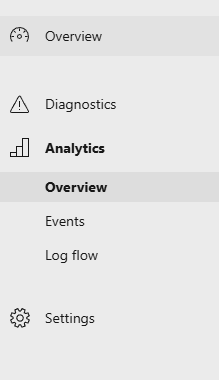
去https://appcenter.ms/ 后台,选择app,然后左侧菜单栏可以看到页签,切页签可以看到对应的数据。
总结
AppCenter虽然说功能没有CrashSight的全,但是作为一款免费插件,还要什么自行车呢!